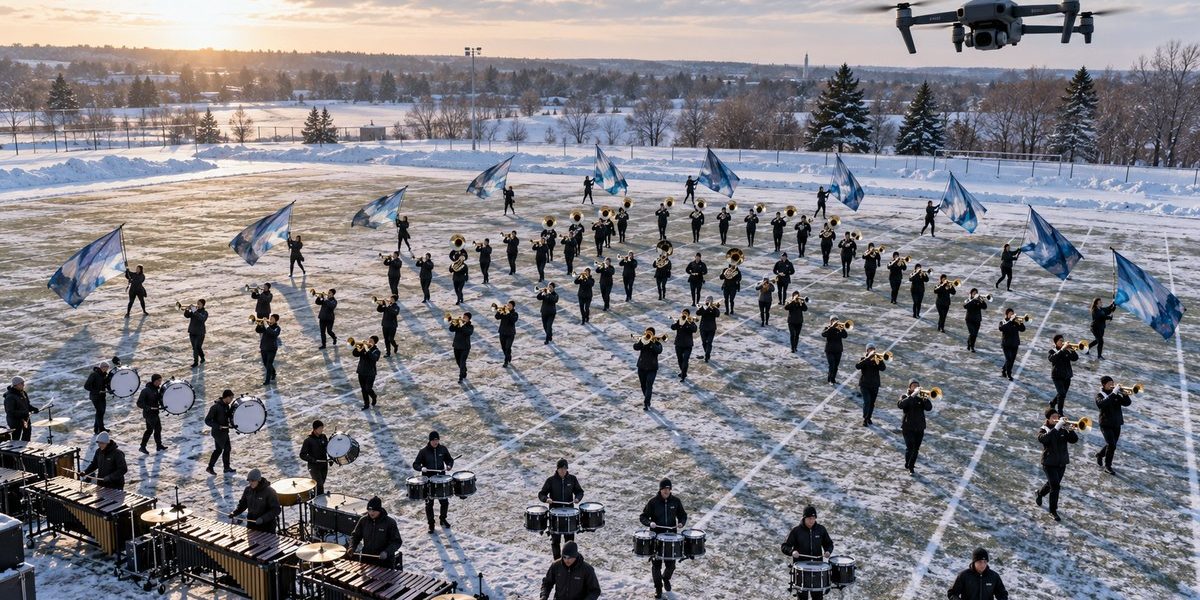
You are standing on the 50 yard line. The air is cold. The sun is low. Your corps is running the same drill segment for the third time. You know the spacing is off in the back corner, but from ground level, you cannot be sure. Every visual instructor has been there. You call a reset, walk the set, make a guess, and hope it sticks. What if you did not have to guess anymore?
This winter, one corps decided to try something different. They pulled a drone out of its case, launched it above the field, and changed how they rehearse visual packages forever. The results were so clear that other programs are already asking how they can do the same.
Using a consumer drone for drum corps visual rehearsals gives instructors a real-time aerial view of drill, interval spacing, and form integrity. This winter pilot program proved that a single overhead pass can replace three ground-level reps, cutting cleanup time in half and giving members immediate visual feedback they can actually see and correct on the spot.
Why a Ground-Level View Is Not Enough
Every visual caption head knows the problem. You stand at the front sideline and call a form. The members look tight from your angle. But when you walk behind the ensemble, you see gaps. You see clusters. You see the slight curve in a line that should be straight.
The issue is perspective. From the ground, you only see one plane. Drill design happens on a two-dimensional grid, but you are watching it from a single point. A drone eliminates that limitation. It gives you the same view the judges will have from the press box, but earlier, cheaper, and with instant replay.
The corps we followed for this case study is a competitive World Class group based in the Midwest. They are not naming themselves publicly yet, but their visual team agreed to share the process. They started testing drone integration during their December camp and have already built it into every weekend rehearsal since.
How the Drone Rehearsal Process Works
The setup is simpler than you might think. Here is the step-by-step workflow they use for every visual block.
-
The visual team marks the field with standard grid tape and cones. The drone operator launches the aircraft to a height of roughly 120 feet. This altitude captures the entire 80-yard field in one frame without fisheye distortion.
-
The corps runs the drill segment once at show tempo. The drone records in 4K at 60 frames per second. The operator keeps the camera pointed straight down to capture true overhead geometry.
-
After the run, the operator lands the drone and transfers the footage to a tablet. The visual staff gathers around the screen. They play back the segment at half speed, pausing on each form.
-
The staff marks problem areas directly on the tablet screen using a drawing app. They highlight spacing gaps, angle breaks, and interval errors. They show the footage to the entire ensemble on a large monitor.
-
The corps resets and runs the segment again. This time, they know exactly where the issues are. They fix the spacing before the staff says a single word.
The entire cycle takes about six minutes. That is faster than walking the set and discussing it.
What the Aerial View Reveals That Ground Level Misses
A drone does not just show you the same thing from higher up. It shows you things you cannot see from the sideline. Here are the most common discoveries the corps made during their first few sessions.
-
Interval drift within a company front. From the ground, a line of 30 members looks straight. From above, you see the third person from the left is six inches too far forward. That six inches breaks the entire visual effect.
-
Diagonal curvature. Diagonal lines are notoriously hard to clean from ground level. A drone reveals exactly where the line bends and which member is causing the curve.
-
Staging overlap. When two forms pass through the same space, the drone shows you the exact moment of collision risk. You can adjust the timing before someone gets hit.
-
Horn angle consistency. With the camera angled at 45 degrees instead of straight down, the staff can see if every horn is at the same plane. Uneven angles show up as different brightness levels in the sunlight.
-
Foot placement uniformity. Overhead footage makes it easy to spot members who are cheating their step size to catch up. The feet do not lie.
Common Mistakes When Using a Drone for the First Time
Not every attempt goes smoothly. The corps made a few errors early on, and they want you to learn from them. The table below shows the most frequent mistakes and the fixes they found.
| Mistake | Why It Happens | How to Fix It |
|---|---|---|
| Blurry footage during fast drill | Drone camera set to auto focus | Lock focus and exposure before the run |
| Battery dying mid-rehearsal | Not tracking flight time | Set a timer for 12 minutes max per battery |
| Members distracted by the drone | Novelty factor | Fly a few warmup passes so everyone gets used to it |
| Footage too shaky for analysis | Wind or aggressive flying | Fly in calm conditions and use a gimbal-locked mode |
| Staff overanalyzing every frame | Too much data | Limit review to two playbacks per drill segment |
The drone is a tool. It does not replace the visual staff. It makes their job faster and more precise.
Setting Up Your Own Drone Rehearsal Program
You do not need a cinema-grade drone to get started. The corps in this case study used a mid-range consumer model that costs under $1,000. Here is what you need to replicate their setup.
-
A drone with a stabilized 4K camera. Look for models with a mechanical gimbal, not just electronic stabilization. The DJI Mini 4 Pro or the Autel Nano series both work well.
-
A bright tablet or laptop for playback. Sunlight glare is your enemy. A matte screen protector helps.
-
A portable battery station. You will burn through three or four drone batteries in a two-hour visual block. A solar charger or a deep-cycle battery pack keeps you in the air.
-
A simple video editing app. You do not need Final Cut Pro. An app like DaVinci Resolve or even the built-in editing tools on an iPad let you slow down footage and draw on frames.
-
A weather check routine. Drones do not fly in rain, heavy wind, or temperatures below freezing for long. Check the forecast before you pack your gear.
“The first time we showed the ensemble their own drill from above, the room went quiet. They saw the gaps immediately. They fixed them without us saying a word. That is the power of letting the footage do the teaching.”
Visual Caption Head, Midwest World Class Corps
When to Use the Drone and When to Put It Away
A drone is not the answer for every rehearsal moment. The corps learned to use it selectively. They deploy the drone during these specific situations.
-
First run of a new drill segment. The overhead view confirms whether the written coordinates translate to the field.
-
Post-lunch cleanup block. Energy dips after lunch. The drone adds a fresh perspective that re-engages the members.
-
Final run before dinner break. The staff uses the footage to assign individual homework for the evening.
They put the drone away during fundamentals blocks, sectionals, and full ensemble music runs. The drone is a visual tool, not a distraction.
What the Members Think About Being Filmed
Some instructors worry that members will feel watched or judged. The opposite happened here. Once the members saw the footage, they started asking for it. They wanted to see their own spacing. They started self-correcting between reps.
One brass section leader said it changed how she thought about her position in the form. She always knew she was supposed to hold interval, but she never realized how much her drift affected the people around her. Seeing it from above made the concept real.
The corps also found that the drone footage helped with member retention. New members, especially rookies, often struggle to understand why spacing matters. A five-second clip from above answers that question better than a five-minute lecture.
If you want to build a stronger individual practice routine away from the field, consider pairing the drone feedback with a structured guide to practicing visuals without a field. The combination of aerial feedback and at-home drills accelerates progress faster than either method alone.
The Cost and Logistics of Going Aerial
Let us talk numbers. A capable drone costs between $800 and $1,500. Extra batteries run about $60 each. A tablet you probably already own. The total upfront investment is roughly the same as buying a new set of matching tenor drums or a single professional-level marching mellophone.
You also need a licensed pilot. The FAA requires a Part 107 certification for any commercial drone operation. That includes drum corps rehearsals if the footage is used for instructional purposes. The test costs about $150 and takes a weekend to study for. Many corps already have staff members who fly recreationally and can get certified quickly.
Insurance is another consideration. Check whether your corps liability policy covers drone operations. Some policies require a separate rider. The cost is usually minimal compared to the value of the rehearsal time you save.
How to Get Your Corps Started This Winter
Winter is the perfect time to test this method. The off-season schedule gives you room to experiment without the pressure of a competition weekend. Here is a plan to launch your own drone rehearsal program before spring tour begins.
-
Week one: Buy the drone and get your pilot certified. Fly a few practice sessions over an empty field to learn the controls.
-
Week two: Introduce the drone during a visual-only rehearsal. Keep the flights short. Focus on one drill segment.
-
Week three: Show the footage to the full ensemble at the end of the day. Let them see what you see. Answer questions.
-
Week four: Build the drone into your standard rehearsal rotation. Use it for two or three runs per visual block.
-
Week five: Compare your cleanup speed to the same period last year. You will likely see a measurable improvement in fewer reps.
The corps in this case study went from skeptical to sold in about two weeks. Their visual caption head now says he would rather give up his clipboard than his drone.
The Future of Visual Rehearsal Technology
This winter experiment is just the beginning. As drone technology gets cheaper and smaller, expect to see more corps adopting aerial feedback as a standard tool. Some designers are already experimenting with live streaming the drone feed directly to a tablet on the field so the visual staff can adjust in real time.
Others are looking at using the footage to create digital overlays that compare the live drill to the original design file. Imagine seeing the intended form and the actual form side by side, with color-coded gap indicators. That technology exists now. It just needs someone to build the workflow for the marching arts.
For now, the simple overhead view is enough. It is cheap, it is fast, and it works. Your members will thank you. Your staff will work smarter. And your drill will get cleaner faster than you thought possible.
If you want to take your rehearsal efficiency even further, check out this guide to building a 30-minute individual practice routine that complements the aerial feedback your members will receive. The combination of group drone analysis and focused personal practice creates a feedback loop that builds cleaner shows from every angle.
Taking the First Step Toward Smarter Rehearsals
You do not need a big budget or a tech team to try this. You need one drone, one certified pilot, and one rehearsal where you are willing to try something new. The corps in this case study started with a single flight over a single form. That one flight changed how they approach every rehearsal since.
Pick a cold Saturday this winter. Charge the batteries. Launch the drone. Watch your drill from above for the first time. You will see things you have been missing for years. And you will wonder why you did not do it sooner.